ZAFROI

Industries Real Estate

Real Estate CRM for builders & brokers Sell every unit.
Collect every rupee.

Leads from Meta, property portals and your website — called on time, followed up on WhatsApp, visited, booked and collected. One system for your sales team, managers and accounts.

or WhatsApp us on +91 85271 38205
15 min
first-response target, then escalation
19 areas
from first lead to last instalment
RERA · GST · TDS
rules you set, versioned
Web + phone
Android and iPhone app
Today’s follow-ups and leads waiting past the response target.
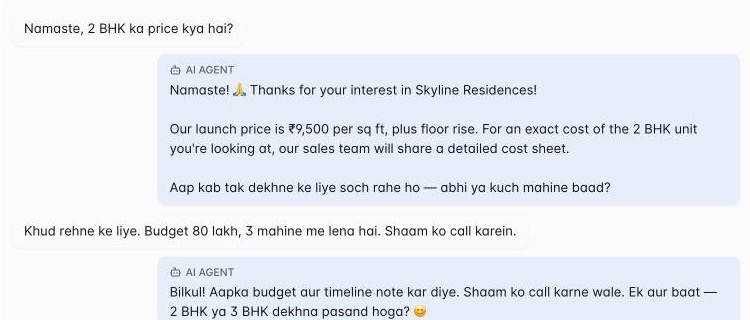
WhatsApp AI · qualifying a buyer
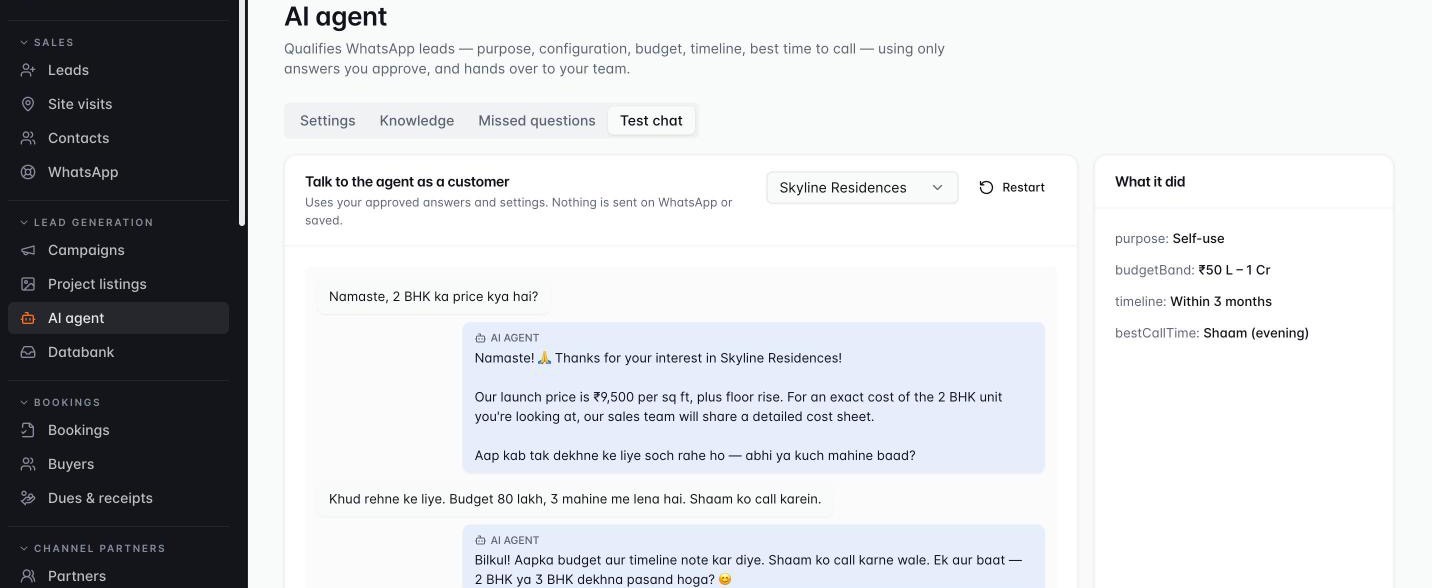
The WhatsApp AI assistant answering a buyer's price question in Hinglish and asking about their timeline.
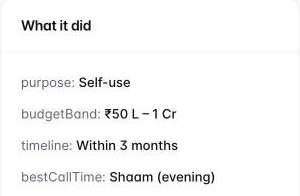
What the AI captured: purpose self-use, budget ₹50 L–1 Cr, timeline within 3 months, best call time evening.

Actual ZAFROI screens · demo data

Sound familiar?

Six places real estate sales leak money — and how ZAFROI closes each one

The leak

Facebook and portal leads get called hours later — or never.

With ZAFROI

Assigned in seconds with a 15-minute call-back target. Missed? It moves on and the team leader is alerted.

See it in the product
The leak

Follow-ups live on personal WhatsApp — and walk out with the salesperson.

With ZAFROI

Every call, WhatsApp and note is logged on the lead. Hand over a leaver’s leads in one go.

See it in the product
The leak

“Site visit done.” But did it really happen?

With ZAFROI

Phone check-in records time, location and distance from the project — with a photo if you want one.

See it in the product
The leak

Bookings, payment plans and dues live in Excel sheets.

With ZAFROI

Booking, approval, payment schedule, demands and receipts — and one dues list.

See it in the product
The leak

Lakhs spent on ads — no idea which one brings bookings.

With ZAFROI

Cost per lead and cost per booking for every campaign, source and agency.

See it in the product
The leak

Channel partners argue over who brought the buyer.

With ZAFROI

Client registration with protection days, one accepted claim, brokerage on the booking.

See it in the product

One app for your whole team

Each person sees what they need to do today — nothing more.

Sales executive

On the phone app

  • Today’s calls, in order of what is due
  • Call or WhatsApp in one tap — logged automatically
  • Check in at the site visit
  • Never miss a promised follow-up

Team leader

Web and phone

  • Who is late on a call-back
  • Reassign leads in one click
  • Team’s visits and follow-ups for the week
  • Step in on a hot lead

Owner / Business head

Dashboard

  • Leads → site visits → bookings, by project
  • Which campaign and agency brings bookings
  • Which team converts better
  • Where buyers are waiting

Accounts & CRM team

Web

  • Bookings and approvals
  • Payment plans, demands and receipts
  • What is due and overdue across all bookings
  • Channel-partner brokerage

Watch a 1-minute tour

Actual ZAFROI Real Estate screens with demo data — from the first enquiry to the last instalment.

Everything in ZAFROI Real Estate

19 areas, from the first enquiry to the last instalment. Watch each one work, or pick the one you care about.

Sales & marketing

Builders · Developer Suite

01 · Lead capture & sources
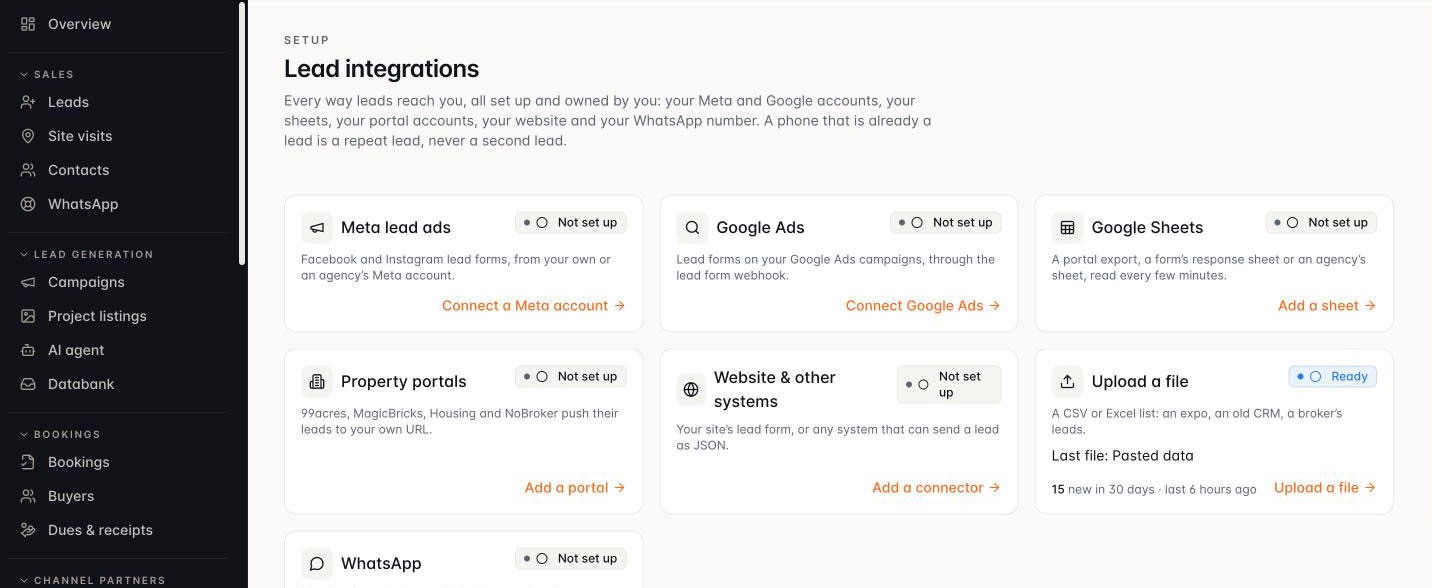
Every enquiry, from every source, in one place.

  1. Portals & website
  2. Meta ads & WhatsApp
  3. Excel & walk-ins
  4. One lead list
Lead integrations: Meta lead ads, Google Ads, Google Sheets, property portals, website and WhatsApp, each connected by you.
Every source, owned by youRepeat enquiry = same lead
Actual ZAFROI product · shown with demo data
  • Website and property-portal enquiries
  • Meta / Facebook lead ads
  • IVR, walk-in and manual leads
  • Excel upload and guided migration
  • Campaign, source and origin tracking
  • Duplicate detection
What each one does

No enquiry slips through the cracks, wherever it comes from.

  • Website and property-portal enquiries — flow straight into your pipeline through secure connectors.
  • Meta / Facebook lead ads — arrive in real time, while the buyer is still interested.
  • IVR, walk-in and manual leads — are captured the same way, including international numbers.
  • Excel upload and guided migration — bring your existing lead data across without starting over.
  • Campaign, source and origin tracking — shows exactly where every lead came from.
  • Duplicate detection — holds repeat enquiries for review, so none are lost and none are double-worked.

02 · Assignment & auto allocation

The right executive, within minutes — automatically.

  • Rule-based routing
  • Round-robin allocation
  • Load-weighted allocation
  • Priority tiers and open-lead caps
  • Working hours and leave awareness
  • 15-minute first-response SLA
  • Automatic reassignment and escalation
  • Response-SLA ageing
  • Bulk assignment, undo and employee handover
  • Full audit trail
What each one does

Fast, fair distribution means faster first calls and higher conversion.

  • Rule-based routing — sends each lead to the right team by project, source or lead type.
  • Round-robin allocation — spreads leads evenly across the right pool of executives.
  • Load-weighted allocation — spreads leads by each executive’s current workload.
  • Priority tiers and open-lead caps — put your best people on the most leads, without overloading anyone.
  • Working hours and leave awareness — skip executives who are off duty or on leave; their untouched leads are redistributed.
  • 15-minute first-response SLA — sets a clock on every new lead (configurable).
  • Automatic reassignment and escalation — move a lead on when the SLA is missed and alert the team leader.
  • Response-SLA ageing — shows how long leads have waited for a response.
  • Bulk assignment, undo and employee handover — keep leads moving when teams change.
  • Full audit trail — records every assignment and reassignment.

03 · Sales execution

Every lead has an owner, a status and a next step.

  1. Today’s queue
  2. One-tap call
  3. Record response
  4. Next follow-up set
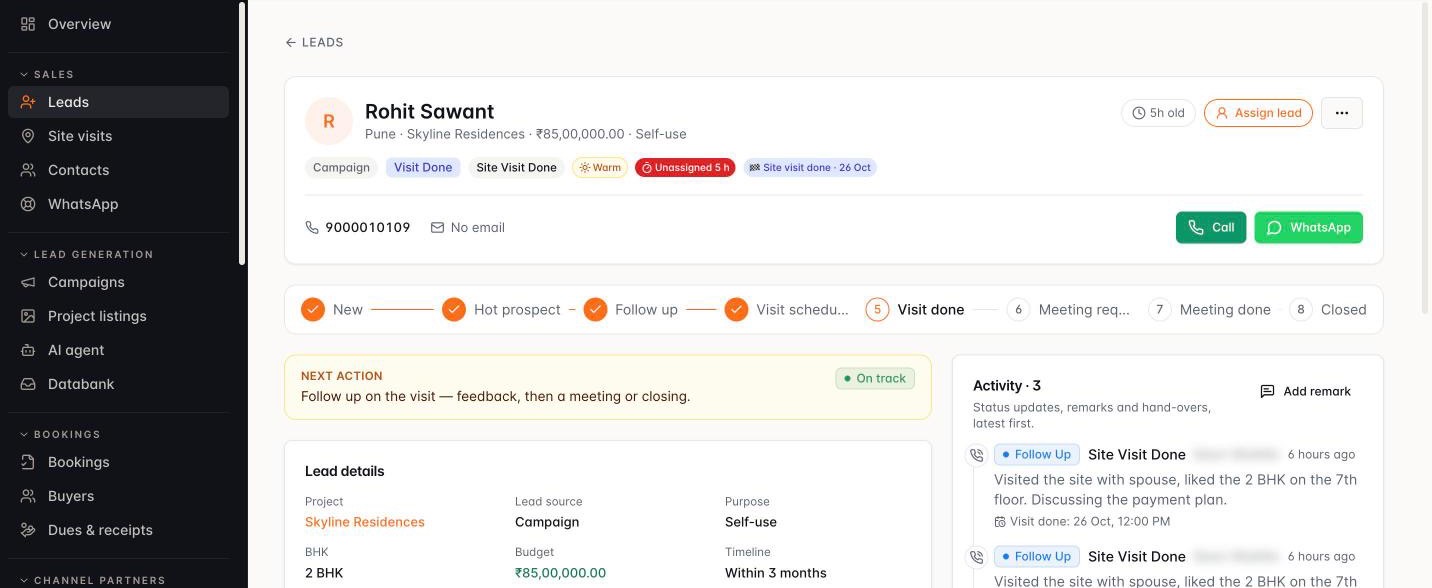
A lead’s page: requirement, budget and best time to call, status steps, and one-tap call or WhatsApp.
Requirement on the leadOne-tap call & WhatsApp
Actual ZAFROI product · shown with demo data
  • Personal lead queue
  • Record response in a few taps
  • Follow-ups, call-backs and a daily schedule
  • One-tap call, WhatsApp and SMS
  • Reminders that escalate
  • Buyer requirements
  • Lead temperature
  • Interaction timeline
  • Team leader and manager visibility
What each one does

Your team always knows what to do next — and managers can see it.

  • Personal lead queue — on web and phone, so executives start each day knowing who to call.
  • Record response in a few taps — status, sub-status, the next date and a remark — kept as a permanent history.
  • Follow-ups, call-backs and a daily schedule — make sure no promised call is forgotten.
  • One-tap call, WhatsApp and SMS — from the lead, with every touch logged.
  • Reminders that escalate — remind the executive, then the team leader, then an admin when a commitment is missed.
  • Buyer requirements — capture purpose, configuration, budget and timeline on the lead.
  • Lead temperature — highlights the hottest prospects first.
  • Interaction timeline — shows the full history of every buyer conversation.
  • Team leader and manager visibility — over every executive’s pipeline.

04 · Site visits & field validation

Visits proven — not just reported.

  1. Visit scheduled
  2. Check-in at site
  3. Photo proof
  4. Outcome & next step
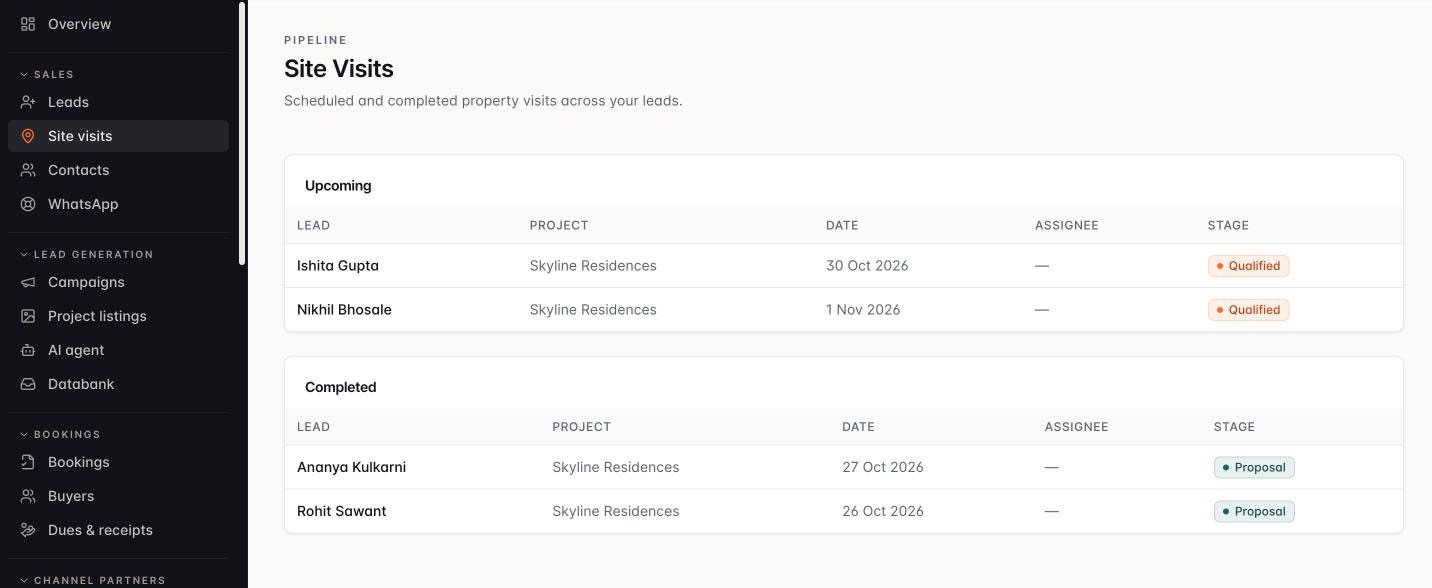
Site visits: upcoming and completed visits by lead, project and stage.
Upcoming and done, in one place
Actual ZAFROI product · shown with demo data
  • Visit scheduling
  • Location- and time-stamped check-in
  • Distance from the project site
  • Configurable photo proof
  • Visit outcomes and post-visit follow-up
  • Visit history and Site Visits report
  • Evidence for managers
What each one does

Know which site visits really happened, and follow up while interest is high.

  • Visit scheduling — coordinates the buyer, the executive and the site.
  • Location- and time-stamped check-in — from the phone app records that the visit took place.
  • Distance from the project site — is recorded with every check-in.
  • Configurable photo proof — requires a photo before selected visit outcomes can be recorded.
  • Visit outcomes and post-visit follow-up — turn interest into the next step.
  • Visit history and Site Visits report — show the visit pipeline at a glance.
  • Evidence for managers — shows who completed each visit, when and from where.

05 · Booking, payment plans & collections
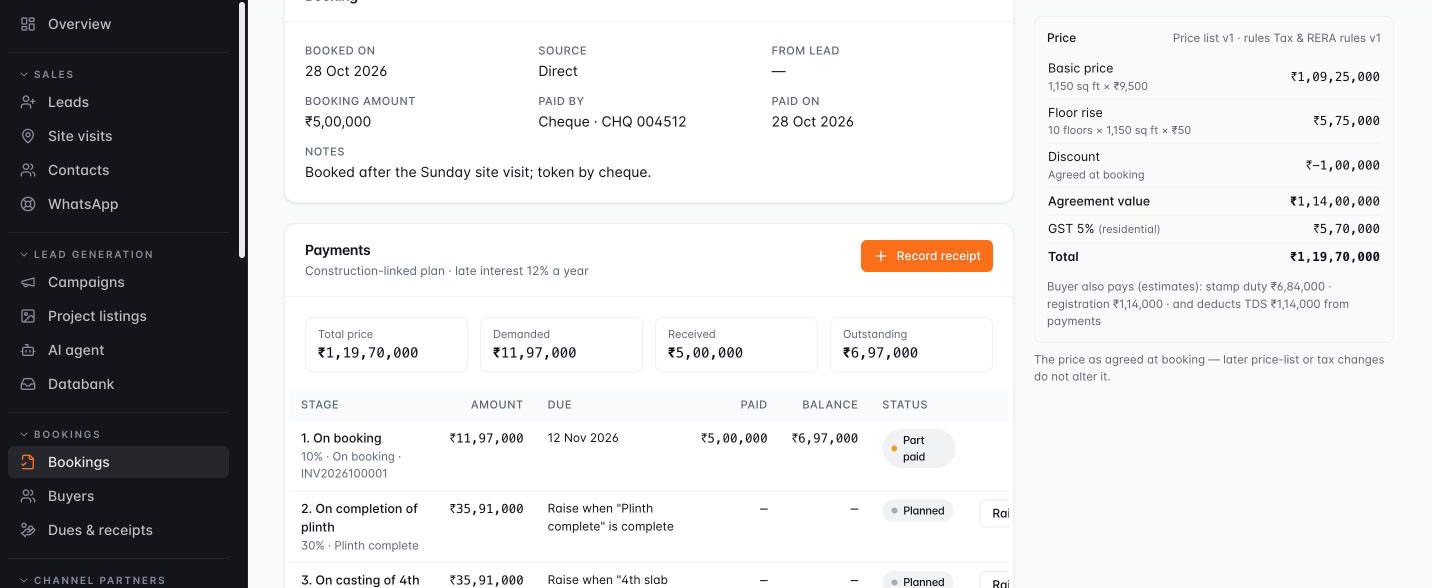
Bookings accounted for, installments tracked.

  1. Unit booked
  2. Discount approved
  3. Payment schedule
  4. Receipts & dues
A booking’s payments: price, demanded, received and outstanding, and the construction-linked schedule.
Schedule on the bookingDemanded vs received
Actual ZAFROI product · shown with demo data
  • Guided deal closure and booking ledger
  • Unit, size, price list and offered rate
  • Discount approvals
  • Working sheet
  • Revenue split
  • Channel-partner attribution
  • Payment-plan templates and schedules
  • Construction-milestone certification
  • Receipt ledger
  • Dues worklist
What each one does

Close deals with control, and know exactly what is due and what has been received.

  • Guided deal closure and booking ledger — capture every booking in one consistent record.
  • Unit, size, price list and offered rate — are recorded on each booking.
  • Discount approvals — ensure management signs off before a booking counts.
  • Working sheet — calculates booking value, brokerage, incentives and net revenue.
  • Revenue split — credits executives and team leaders fairly.
  • Channel-partner attribution — records which partner brought the deal.
  • Payment-plan templates and schedules — support down-payment and construction-linked plans, in % or fixed amounts.
  • Construction-milestone certification — sets due dates for construction-linked installments.
  • Receipt ledger — records every payment received against each booking.
  • Dues worklist — shows what is due across all bookings, so collections never slip.

06 · Channel partners

Partners attributed, deals reviewed, commission clear.

  1. Partner onboarded
  2. Client registered
  3. Protection days
  4. Brokerage on booking
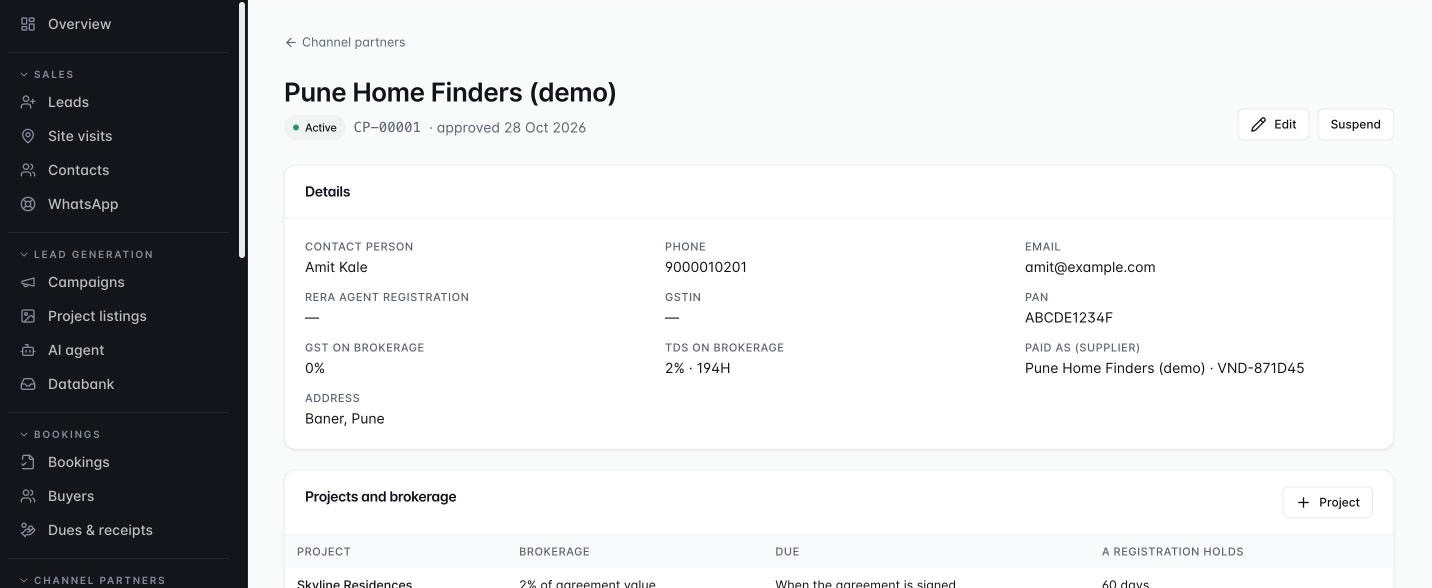
A channel partner: TDS on brokerage, brokerage per project and how long a client registration holds.
Brokerage per projectProtection days per project
Actual ZAFROI product · shown with demo data
  • Partner onboarding and documents
  • Client registration with protection days
  • Deal submission and review
  • Commission per deal
  • Partner-wise leads, deals and bookings
  • Net revenue after commission
What each one does

Grow through partners without disputes over who brought the buyer.

  • Partner onboarding and documents — keep every partner’s records in one place.
  • Client registration with protection days — one accepted claim per client per project.
  • Deal submission and review — give partner deals a clear approval path.
  • Commission per deal — as a percentage or fixed amount.
  • Partner-wise leads, deals and bookings — show which partners perform.
  • Net revenue after commission — shows the real value of every partner deal.

07 · Marketing, vendors & ROI

Know which rupee of marketing brings bookings.

  • Campaigns by project
  • Sources, agencies and vendors
  • Agency spend, invoices and payments
  • Daily lead inflow
  • Funnel by source
  • Cost per lead and cost per booking
  • Campaign ROI
  • Vendor comparison
What each one does

Spend more on what works and stop paying for what doesn’t.

  • Campaigns by project — tie marketing activity to the inventory you are selling.
  • Sources, agencies and vendors — are tracked with their own categories.
  • Agency spend, invoices and payments — are recorded against each vendor.
  • Daily lead inflow — by project and source shows demand as it arrives.
  • Funnel by source — from lead to qualified lead, visit and booking.
  • Cost per lead and cost per booking — for every source and vendor.
  • Campaign ROI — traced from campaign to lead, visit, booking and revenue.
  • Vendor comparison — shows which agencies deliver quality business.

For wider campaign planning, publishing, email marketing and audiences, add ZAFROI Growth — Demand Generation.

08 · Databank & tele-calling
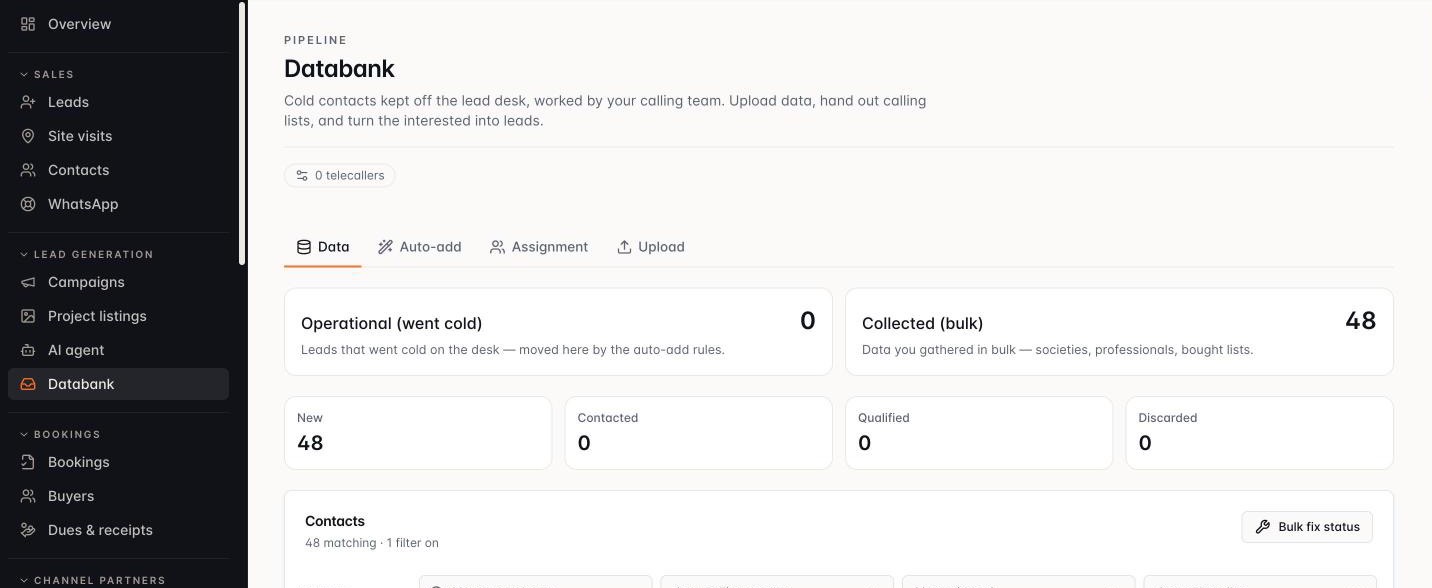
Cold contacts, worked into fresh pipeline.

  1. Cold contacts
  2. Calling lists
  3. Call & qualify
  4. Promoted to lead
Databank: cold contacts kept off the lead desk — new, contacted, qualified and discarded.
Cold data, off the lead desk
Actual ZAFROI product · shown with demo data
  • Cold-contact databank
  • Hand-picked calling lists
  • Call and promote
  • AI tele-calling over WhatsApp
  • Tele-calling report
What each one does

Turn old and cold contact lists into new leads.

  • Cold-contact databank — kept separate, so it never clutters the live pipeline.
  • Hand-picked calling lists — for each tele-caller, for a named target project.
  • Call and promote — turns an interested contact into an owned lead with an SLA.
  • AI tele-calling over WhatsApp — works through calling lists automatically — and by voice with the AI Voice Agent add-on.
  • Tele-calling report — assigned, attempted, interested and converted, by caller and project.

09 · AI lead engagement

A WhatsApp assistant that engages every lead — and hands over at the right moment.

  1. Buyer WhatsApps
  2. AI replies
  3. Requirement captured
  4. Handed to executive
The WhatsApp AI assistant answering a buyer in Hinglish and capturing purpose, budget, timeline and best time to call.
Talks the way buyers writeOnly answers you approve
Actual ZAFROI product · shown with demo data
  • Instant WhatsApp conversations
  • Requirement collection
  • Project knowledge base
  • Qualification
  • Conversation on the lead
  • Human handover
  • Opt-in per lead, opt-out honoured
  • AI Voice Agent (add-on)
  • AI voice tele-calling
What each one does

Respond instantly, qualify consistently and give your executives warmer conversations. Opt-in, off by default.

  • Instant WhatsApp conversations — with new leads, at any hour, from your own WhatsApp number.
  • Requirement collection — captures purpose, configuration, budget, timeline and best time to call.
  • Project knowledge base — answers buyer questions from approved information only.
  • Qualification — separates serious buyers from browsers.
  • Conversation on the lead — so the executive is briefed before the call.
  • Human handover — take over the conversation, or hand it back, at any time.
  • Opt-in per lead, opt-out honoured — keep engagement respectful.
  • AI Voice Agent (add-on) — AI voice calls for first response, qualification, follow-up and site-visit confirmation, with the outcome and summary on the lead.
  • AI voice tele-calling — works through Databank calling lists, with escalation and handover to the assigned executive.

Usage charges extra where applicable: WhatsApp Business conversation charges, AI voice call minutes and telephony, and AI usage are billed at actuals.

10 · Management dashboards & control

Management sees what is happening — not what happened last week.

  1. Inflow
  2. SLA & ageing
  3. Team performance
  4. Conversion
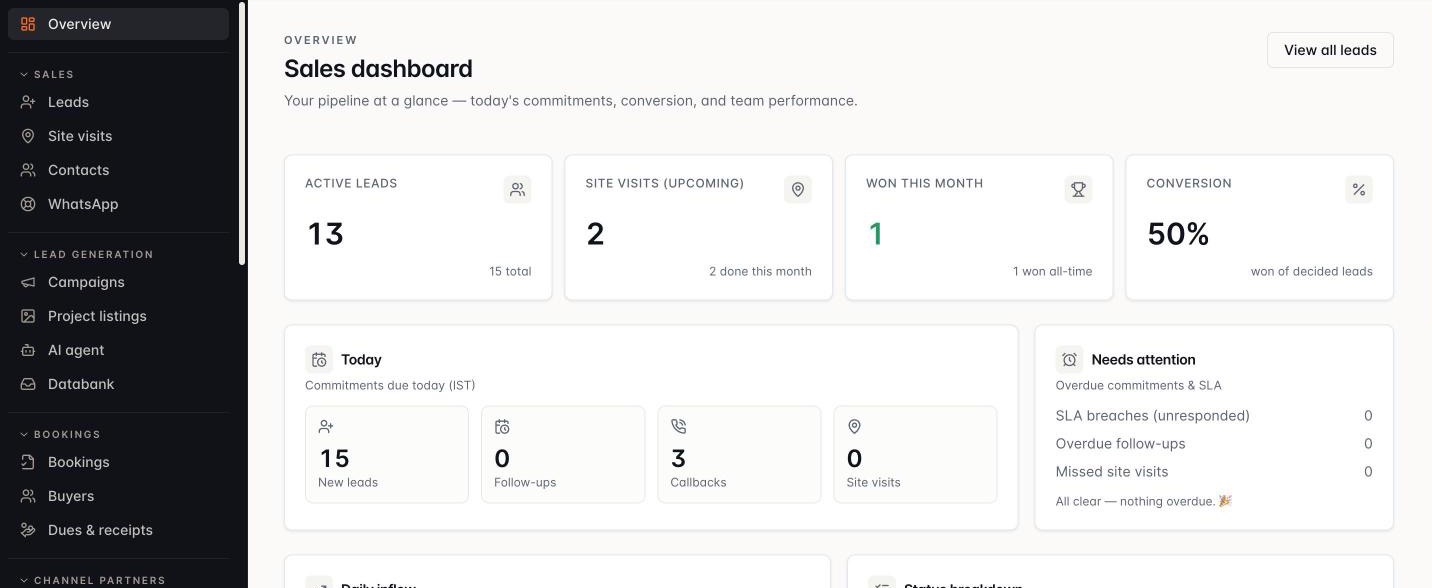
Sales dashboard: active leads, visits, wins, conversion, today’s follow-ups and leads needing attention.
Today at a glanceWhat needs attention
Actual ZAFROI product · shown with demo data
  • Lead funnel and status breakdown
  • Response SLA and lead ageing
  • Team performance and work summary
  • Team leader workspace and business head cockpit
  • Inflow and status reports
  • Site-visit pipeline and booking conversion
  • Source and campaign effectiveness
  • Configurable dashboard cards
  • Management follow-up threads
  • Lead desk
What each one does

Step in early, where it matters.

  • Lead funnel and status breakdown — across projects and teams.
  • Response SLA and lead ageing — show where buyers are waiting.
  • Team performance and work summary — for every executive.
  • Team leader workspace and business head cockpit — give each level the view it needs.
  • Inflow and status reports — by project, team leader and member, with CSV export.
  • Site-visit pipeline and booking conversion — track the path to revenue.
  • Source and campaign effectiveness — show what is working.
  • Configurable dashboard cards — put your key numbers up front.
  • Management follow-up threads — on individual leads.
  • Lead desk — with overdue, SLA, duplicate and handover views.

11 · People & governance

Accountability built in.

  1. Teams & managers
  2. Roles you define
  3. Shifts & leave
  4. Audit trail
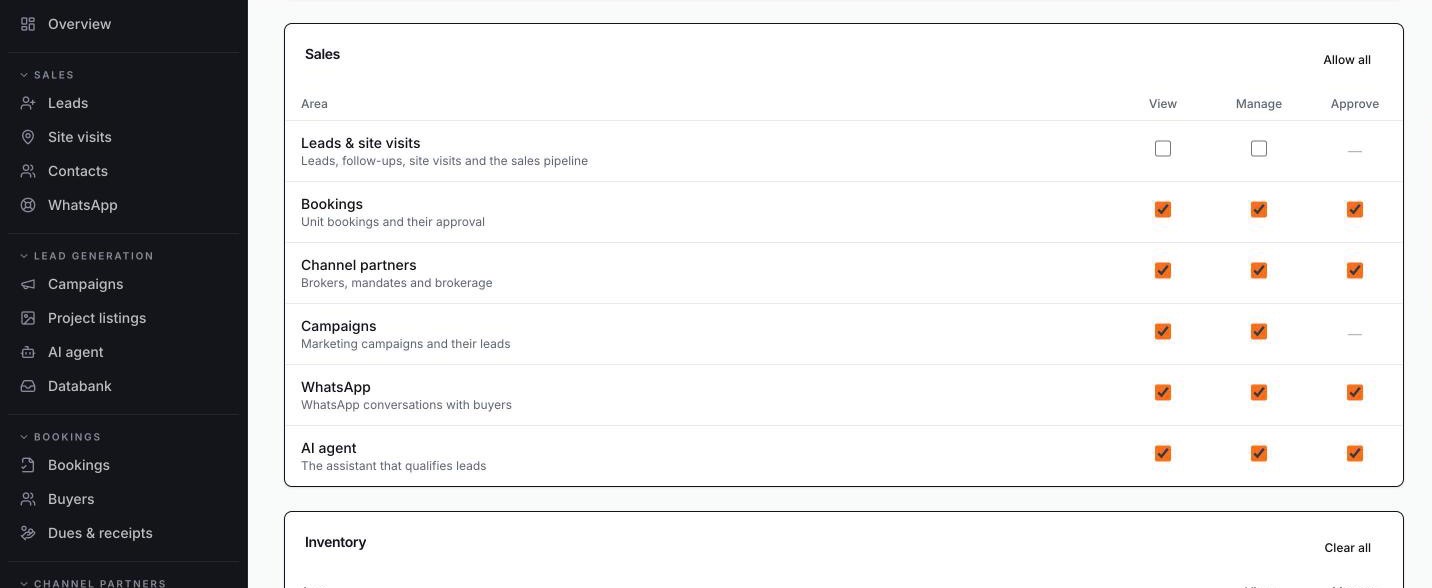
Role editor: view, manage and approve rights for each area.
View · Manage · Approve, per area
Actual ZAFROI product · shown with demo data
  • Users, roles, departments and reporting lines
  • Attendance, shifts and leave
  • On-work / on-leave visibility
  • Complete audit trail
  • Phone app for field teams
  • HR and payroll
What each one does

Clear roles, clear reporting lines and a record of every decision.

  • Users, roles, departments and reporting lines — control who sees and does what — define your own roles.
  • Attendance, shifts and leave — feed directly into lead assignment.
  • On-work / on-leave visibility — for managers.
  • Complete audit trail — of assignments, status changes and approvals.
  • Phone app for field teams — on Android and iPhone.
  • HR and payroll — with ZAFROI Workforce.

12 · Business profiles & development models Developer Suite
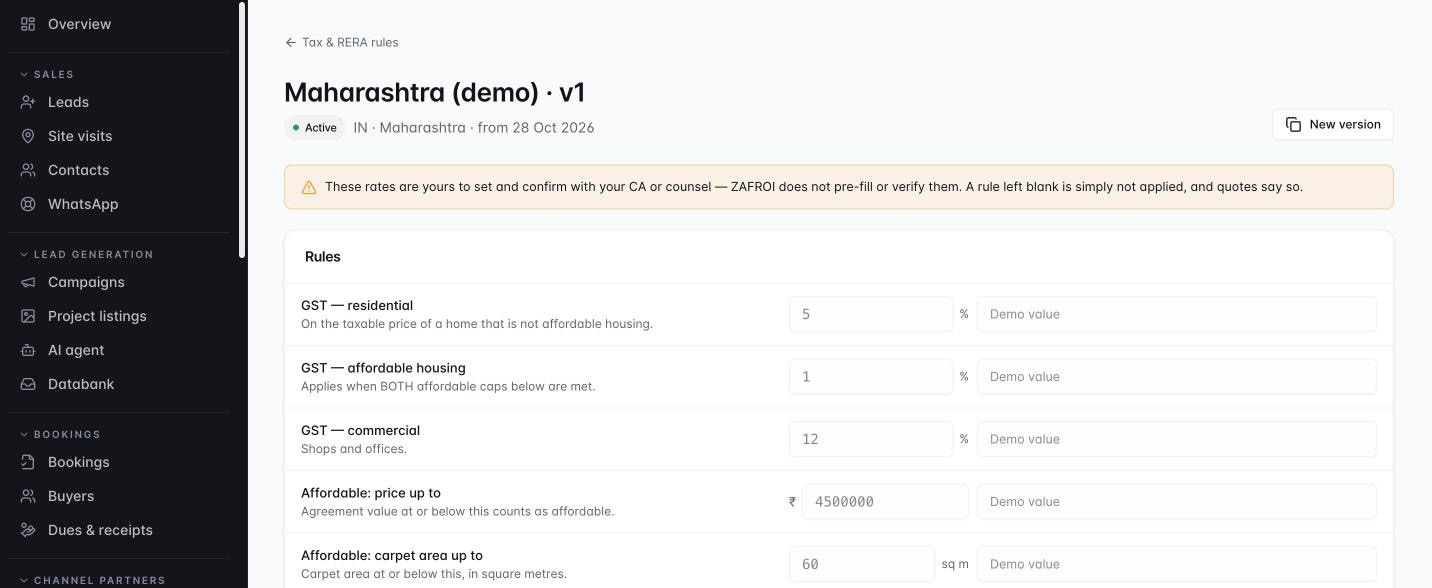
One template for developers and sales-mandate firms.

  1. Developer or mandate
  2. Switch on what you need
  3. GST, TDS, stamp duty
  4. RERA rules
Tax and RERA rule set with GST, affordable-housing limits and advance-before-agreement rates you set.
Your rates, versioned
Actual ZAFROI product · shown with demo data
  • Developer and Sales-mandate profiles
  • Unit allocation
  • India-first rules
  • Development agreements (JV, JDA, revenue share, area share)
What each one does

Configure ZAFROI around how your business actually develops and sells.

  • Developer and Sales-mandate profiles — with capability presets — switch on only what you need.
  • Unit allocation — across developer, landowner and JV partner.
  • India-first rules — for RERA, GST, TDS and stamp duty — versioned, with the rates you set.
  • Development agreements (JV, JDA, revenue share, area share) — as full agreements with partner payouts.

13 · Land & approvals Developer Suite
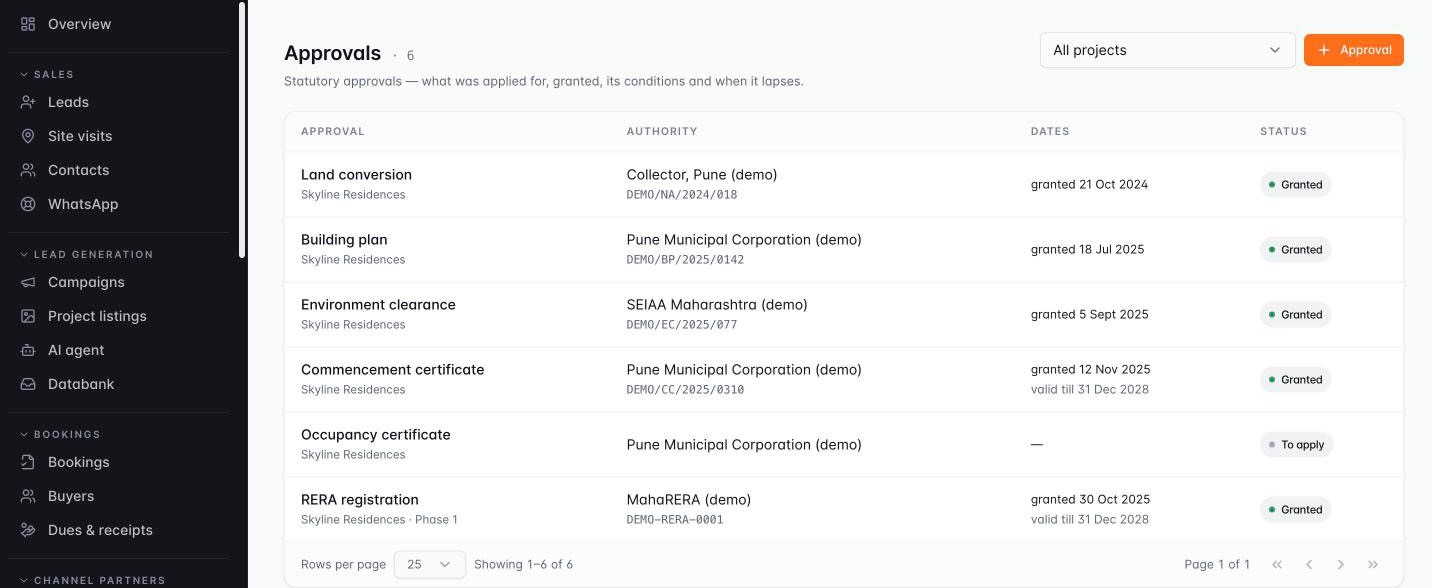
Every parcel, agreement and approval on record.

  1. Land opportunity
  2. Title & due diligence
  3. Feasibility & IRR
  4. Approvals & RERA
Approvals register: land conversion, building plan, environment clearance, commencement, RERA and occupancy, with authority, reference and dates.
Every approval, with its datesRERA by phase
Actual ZAFROI product · shown with demo data
  • Approvals register
  • Land opportunities
  • Land parcels and landowners
  • Title and legal due diligence
  • Feasibility scenarios
What each one does

Make land decisions with the full picture, and never lose track of an approval.

  • Approvals register — including RERA registration by phase.
  • Land opportunities — tracked from sourcing to acquisition.
  • Land parcels and landowners — with KYC.
  • Title and legal due diligence — with evidence attached.
  • Feasibility scenarios — covering saleable area, cost, price, cash flow and IRR.

14 · Projects, inventory & pricing Developer Suite
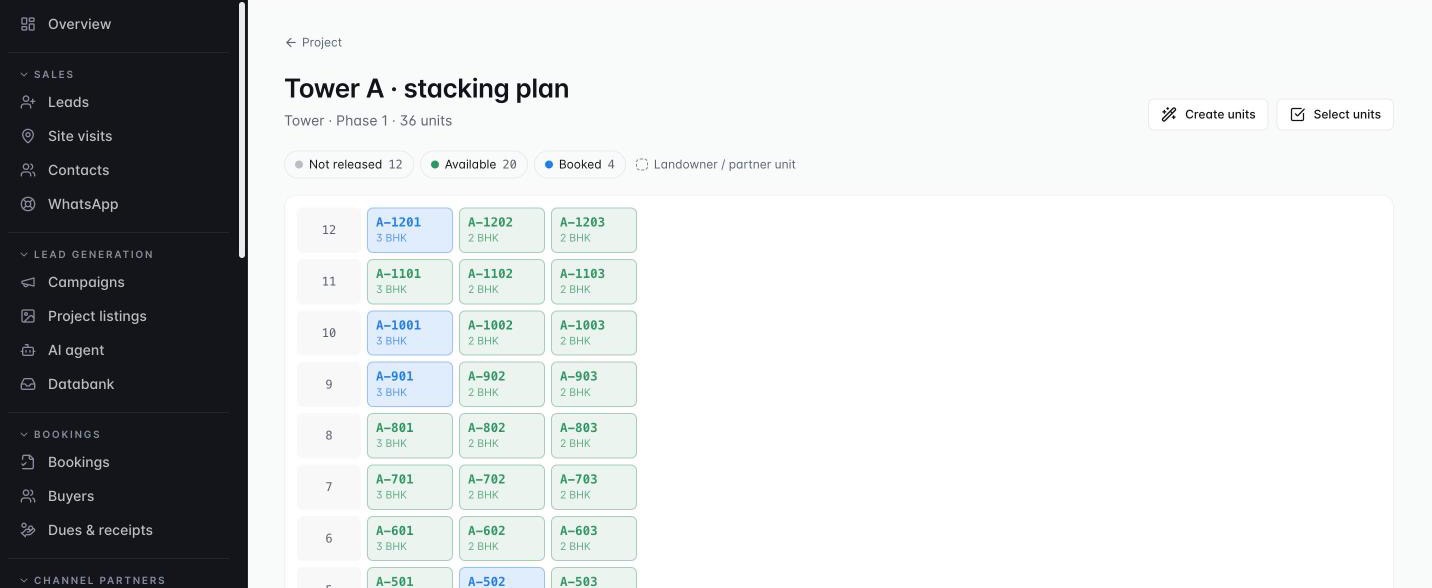
See every unit. Release and price with control.

  1. Project › tower › unit
  2. Stacking plan
  3. Versioned price list
  4. Release, hold & book
Stacking plan: every unit of a tower coloured by status.
Every unit by statusHold & book from the grid
Actual ZAFROI product · shown with demo data
  • Project hierarchy
  • All unit types
  • Stacking plan
  • Unit lifecycle
  • Versioned price lists
  • Inventory release in batches
  • Document register
What each one does

Sell the right units at the right price, with no double bookings.

  • Project hierarchy — from project and phase to tower, floor and unit.
  • All unit types — apartments, villas, plots, shops and offices, with carpet, built-up and super area.
  • Stacking plan — a tower-by-floor grid of unit status — hold and book straight from the grid.
  • Unit lifecycle — from available to booked and registered.
  • Versioned price lists — with base rate, PLC, floor rise and charges.
  • Inventory release in batches — to control what goes to market and when.
  • Document register — for title, approvals, agreements and KYC.

15 · Construction management Developer Suite
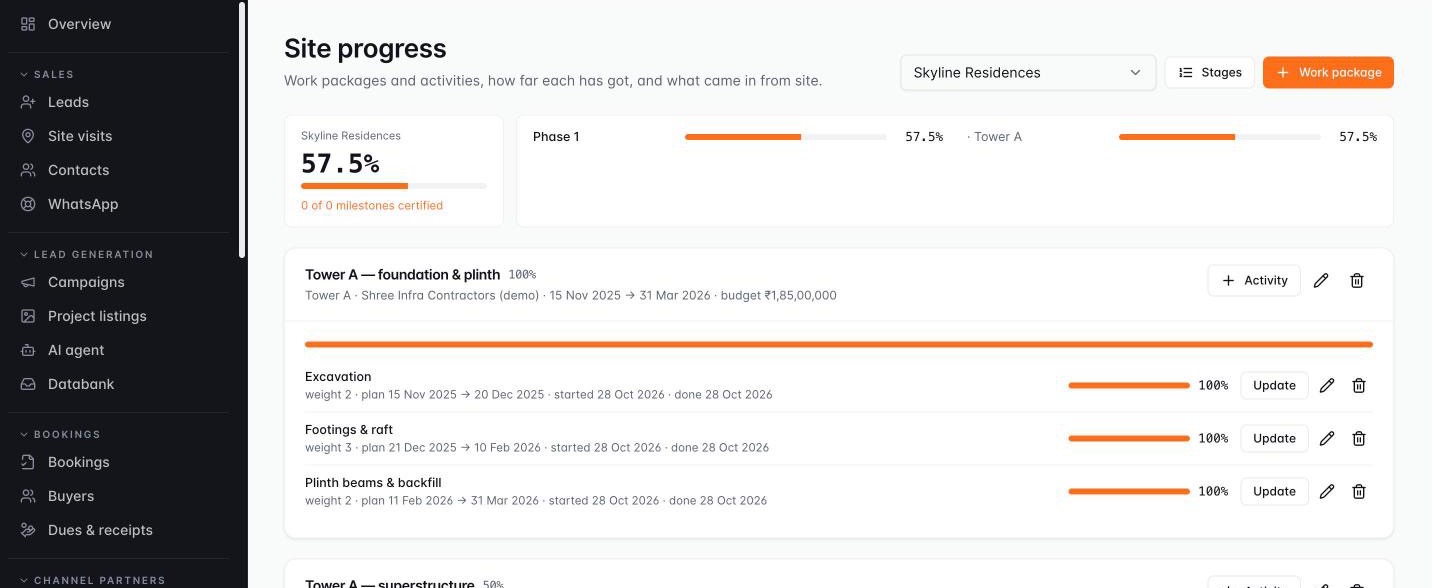
Progress certified on site, demands raised automatically.

  1. Plan (WBS)
  2. Site progress
  3. Photos from site
  4. Milestone → demand
Site progress: work packages and weighted activities, planned vs actual, with project and tower progress.
Progress by towerPlanned vs actual
Actual ZAFROI product · shown with demo data
  • Construction plan (WBS)
  • Planned vs actual schedule
  • Site progress from the phone app
  • Milestone certification
  • Automatic demands
What each one does

Link construction progress directly to cash flow.

  • Construction plan (WBS) — from phase and structure down to activities and milestones.
  • Planned vs actual schedule — shows delays early.
  • Site progress from the phone app — with photos.
  • Milestone certification — with certificates and photos.
  • Automatic demands — raised as soon as a construction milestone is certified.

16 · Procurement, contractors & payables Developer Suite
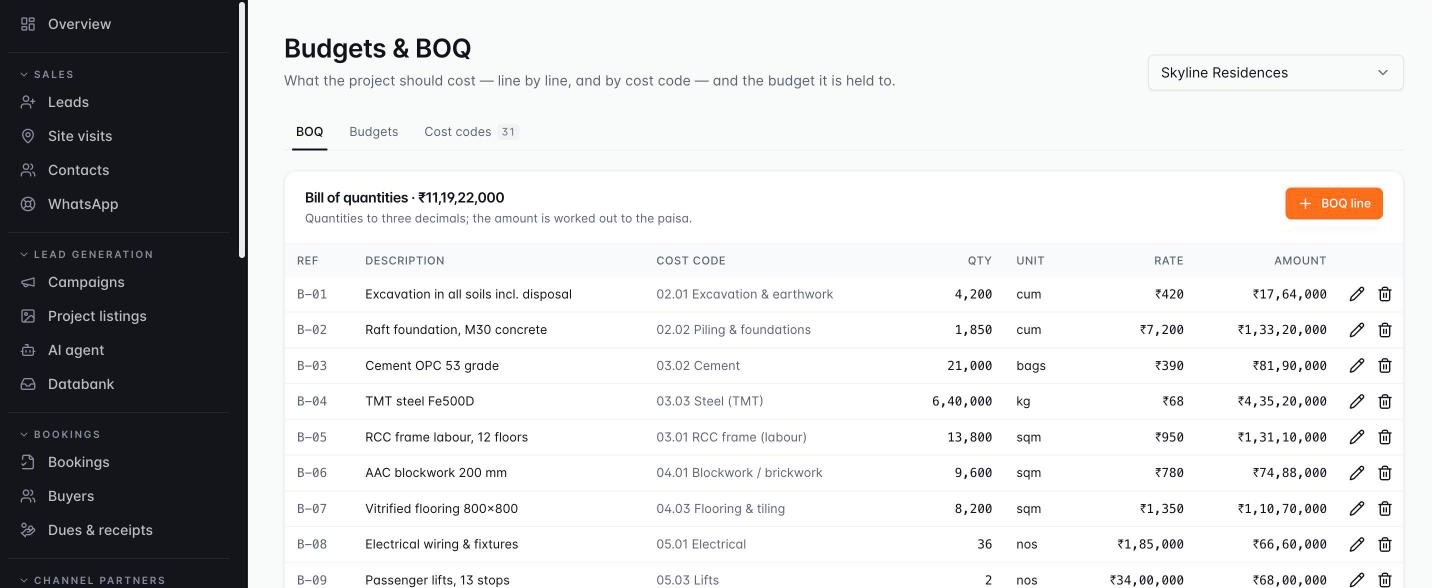
Budgets, contractors and bills under control.

  1. BOQ & budget
  2. Orders & receipts
  3. Work orders & RA bills
  4. Approved payments
Bill of quantities by cost code: quantity, unit, rate and amount.
BOQ by cost code
Actual ZAFROI product · shown with demo data
  • BOQ and project budgets
  • Material orders and site receipts
  • Contractor work orders
  • RA bills
  • Payables
  • Approvals, part-payments and retention ledger
  • Tally export
  • Budget vs committed vs actual
What each one does

Keep project costs within budget and pay contractors accurately.

  • BOQ and project budgets — by cost code.
  • Material orders and site receipts — supplier bills matched to what the site accepted.
  • Contractor work orders — with retention and advances.
  • RA bills — with measurement, deductions, retention and TDS.
  • Payables — for vendors, contractors and brokerage.
  • Approvals, part-payments and retention ledger — keep every outgoing payment controlled.
  • Tally export — for your accountant.
  • Budget vs committed vs actual — for every project and cost code.

17 · Developer sales, agreements & collections Developer Suite
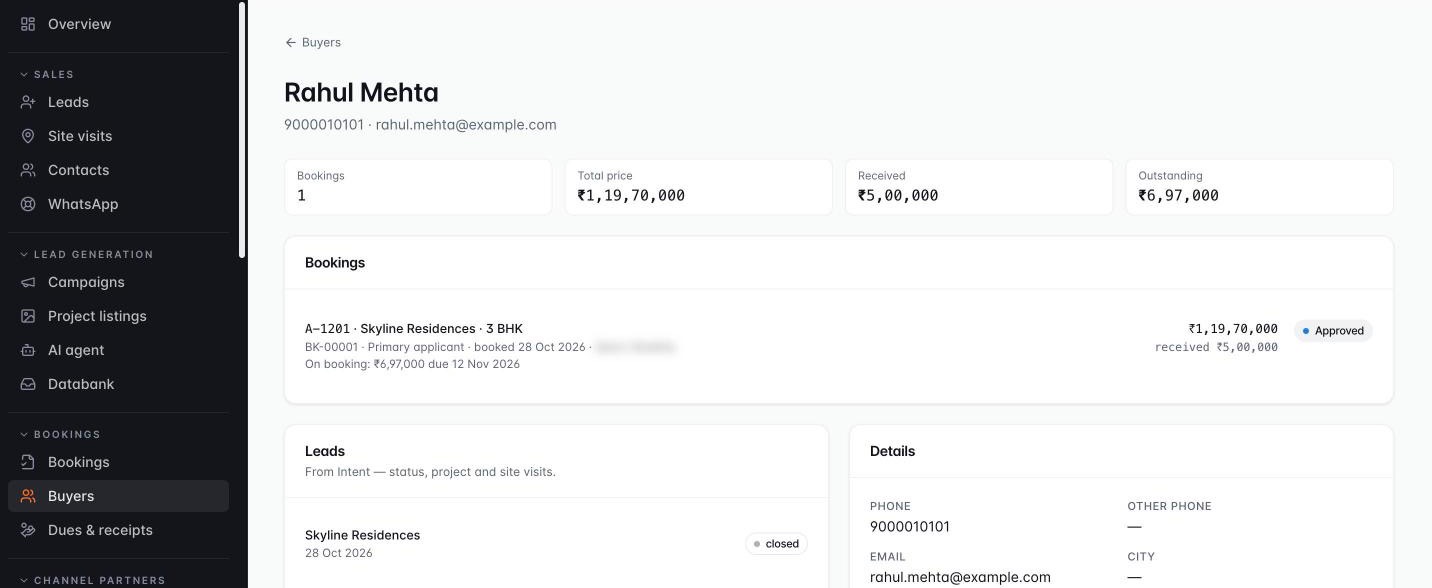
From booking to registered agreement — and every rupee collected.

  1. Booking
  2. Agreement signed
  3. Demands raised
  4. Receipt & RERA split
Buyer 360: bookings, total price, received and outstanding, linked leads and details.
One view of the buyer
Actual ZAFROI product · shown with demo data
  • Bookings with applicants
  • Allotment and agreement for sale
  • Demand schedules
  • Demand notes, receipts and receivables
  • Delayed-payment interest
  • Collection split
  • Cancellations
  • Mandate billing
  • Buyer 360
What each one does

Protect cash flow and keep RERA accounts straight on every booking.

  • Bookings with applicants — and a snapshot of the price and rules at the time of booking.
  • Allotment and agreement for sale — tracked from draft to signed and registered.
  • Demand schedules — generated per booking from payment-plan templates.
  • Demand notes, receipts and receivables — for every buyer.
  • Delayed-payment interest — where your rules apply.
  • Collection split — to the RERA designated account on every receipt.
  • Cancellations — with forfeiture rules, credit note and refund.
  • Mandate billing — to developer clients, for sales-mandate firms.
  • Buyer 360 — units, schedule, dues and documents in one view.

18 · Portals, possession & after-sales Developer Suite

Partners and buyers get their own window.

  • Buyer portal
  • Channel-partner portal
  • Possession and handover checklist
  • Snag management
  • Post-possession support tickets
  • Construction-update broadcasts
What each one does

Give channel partners and buyers what they need — without giving them your system.

  • Buyer portal — payment schedule, receipts, construction milestones and shared documents.
  • Channel-partner portal — client registration, status and brokerage.
  • Possession and handover checklist — from dues clearance to keys, documents and meter readings.
  • Snag management — with photos, contractor assignment and SLA.
  • Post-possession support tickets — buyer issues tracked to closure.
  • Construction-update broadcasts — to buyers on WhatsApp.

19 · Portfolio & project intelligence Developer Suite

Every project’s health, at a glance.

  • Portfolio view
  • Project P&L and cost-to-complete
  • Collection efficiency and RERA account compliance
  • Inventory ageing and absorption
What each one does

Run the whole portfolio from one view.

  • Portfolio view — of inventory, sales, collections and construction across all projects.
  • Project P&L and cost-to-complete — show true profitability.
  • Collection efficiency and RERA account compliance — tracked continuously.
  • Inventory ageing and absorption — show how fast each project is selling.

Capabilities and configuration vary by deployment and selected scope.

For builders and developers · Developer Suite

Every unit, every rupee, every slab — in one place.

  • Inventory & pricing — towers, floors and units on a stacking plan; versioned price lists with floor rise and PLC.
  • Booking to registration — approval, allotment, agreement and registration, with cancellations handled properly.
  • Collections — demands from the payment plan, receipts, interest, and the RERA designated-account split on every receipt.
  • Construction — site progress from the phone; certify a slab and the linked installment falls due.
  • Contractors & purchase — BOQ and budgets, work orders, RA bills with retention and TDS, Tally export.
  • Portals — channel partners register clients; buyers see their schedule, receipts and progress.
Stacking plan: every unit of a tower coloured by status.
Actual ZAFROI product · shown with demo data

Why switch

Built for how Indian real estate sells — not a generic CRM bent to fit

  • PLC & floor-rise pricingBuilt in
  • GST, TDS & stamp duty rulesBuilt in
  • RERA designated-account splitBuilt in
  • Construction-linked payment plansBuilt in
  • Channel-partner protection daysBuilt in
  • WhatsApp on every leadBuilt in
What you needExcel & WhatsApp groupsGeneric CRMZAFROI Real Estate
Portal, Meta ad and website leads land and get assigned Copied by hand Setup needed Built in
Repeat enquiries caught, not double-worked Missed Partly Built in
Site visits proven with location and time On trust Rarely Built in
Channel-partner registration and protection days Disputes Custom build Built in
Live unit inventory, hold and book from the grid Separate sheet Not included Built in
Payment plan, demands and dues on the booking Separate sheet Not included Built in
Leads and chats stay when an executive leaves Lost with the phone Yes Built in

A typical comparison. Generic CRMs differ, and many can be customised at extra cost.

For owners and managers

The questions you ask every Monday — answered on screen

Marketing

  • Where is the marketing money going?
  • Which source or vendor brings quality business?
  • Which projects are converting?

Sales

  • Which team is converting better?
  • Who is overloaded with leads?
  • Where are SLAs being missed?
  • Which visits turn into bookings?

Owner & accounts

  • Which installments fall due, and when?
  • Where does management need to step in?
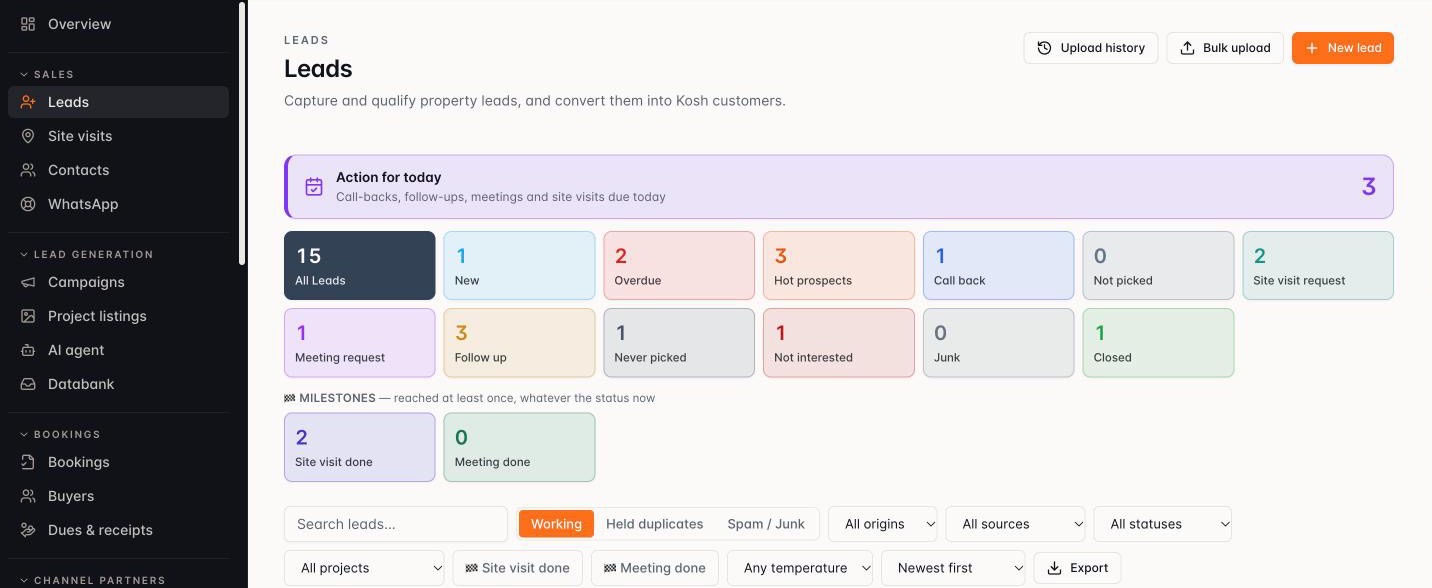
Leads: action for today, and every lead counted by status — new, overdue, hot, call back, site visit, closed.
Actual ZAFROI product · shown with demo data

Packages

Start with sales. Add bookings, collections and AI when you are ready.

Priced per user per month — ask for pricing for your team size.

Basic

Sales execution essentials

Best for: Broker teams and new sales desks

  • Lead capture: website, portals, Meta, IVR, manual, Excel
  • Duplicate review and lead origin
  • Rule-based routing and round robin
  • First-response SLA, reassignment, escalation
  • Executive queue, status, follow-ups, reminders
  • Call, WhatsApp and SMS activity log
  • Site visits with location check-in
  • Overview dashboard and reports with CSV
  • Mobile app for field teams
  • Users, roles, reporting lines, audit trail
Get pricing
Most popular

Pro

Full sales, booking & marketing control

Best for: Builders with a sales team and channel partners

  • Everything in Basic, plus:
  • Leave-aware, working-hours allocation
  • Load-weighted allocation
  • Bulk assign, undo reassignment, handover
  • Configurable photo proof, distance from site
  • Booking ledger, working sheet, approvals, revenue split
  • Payment plans and per-booking schedules
  • Channel partners: onboarding, deals, commission
  • Vendors, agency spend, cost per lead / booking, ROI
  • Databank and tele-calling
  • Business Head cockpit, dashboard cards, follow-up threads
  • Attendance, shifts and leave
Get pricing

Pro+

AI engagement & collections

Best for: High lead volumes, AI first response and collections

  • Everything in Pro, plus:
  • WhatsApp AI Assistant (opt-in)
  • AI tele-calling over WhatsApp
  • Construction-milestone certification
  • Receipt ledger and dues worklist
  • Guided data migration
Get pricing

AI Voice Agent

Add-on to Pro or Pro+
  • First-response calls
  • Inbound & outbound
  • Voice qualification
  • Follow-up & visit confirmation
  • Voice tele-calling
  • One lead context across WhatsApp, voice & team

Developer Suite

Add-on to Pro or Pro+
  • Profiles & unit allocation
  • Tax & RERA rules
  • Approvals register
  • Stacking plan & price lists
  • Construction WBS
  • Procurement & payables
  • Tally export
  • Agreements & demand notes
  • RERA collection split
  • Buyer 360
  • Buyer & partner portals

Run it as shared SaaS on the ZAFROI cloud, a dedicated instance, or a private deployment in your own cloud account.

Usage charges extra where applicable — WhatsApp Business conversations, SMS, AI voice minutes and telephony, and AI usage at actuals.

FAQ

Questions owners ask us

Still unsure? Ask us on WhatsApp.

WhatsApp +91 85271 38205
What exactly is ZAFROI Real Estate?

A real estate CRM and operating system for builders, developers and channel-partner firms: leads, follow-ups and site visits, plus bookings, payment plans and collections — and for builders, inventory, construction and contractor bills — on web and phone.

Will my sales team actually use it?

The phone app shows each executive today’s calls in order of what is due, with one-tap call and WhatsApp. Updating a lead takes a tap, not a form.

Does it work for brokers and channel-partner firms?

Yes. Choose the Sales-mandate profile: client registration with protection days, mandate billing to developer clients and brokerage are built in.

Does the WhatsApp assistant message buyers on its own?

Only when you switch it on — it is opt-in and off by default. It answers from the project information you approve and hands over to your executive.

Does it work with 99acres, MagicBricks and Housing?

Yes. Property portals push their leads to your own ZAFROI link; Meta and Google lead forms connect from your own accounts. A phone that is already a lead becomes a repeat enquiry, never a duplicate.

Does it work with Tally?

Yes — vendor, contractor and brokerage payables export to Tally for your accountant.

Can we bring our existing leads from Excel?

Yes — Excel upload and guided migration bring your existing data across.

How is it priced?

Per user per month on the Basic, Pro and Pro+ packages, with the Developer Suite as an add-on. Pricing on request; WhatsApp, SMS and AI usage are billed at actuals.

Where is it hosted?

Shared SaaS, a dedicated instance, or a private dedicated deployment in your own cloud account.

See it on your own projects.

A 30-minute walkthrough of your sales process — your projects, your team.

  1. 01

    Show us how you sell today

    Your projects, sources, team and approvals.

  2. 02

    We map ZAFROI to it

    Your statuses, rules, payment plans and roles.

  3. 03

    Adopt it step by step

    Start with sales; add bookings, collections and the Developer Suite when ready.

Engineered by Saffron Synaptiq Software Lab.